
Designing Media Hosting for The Builder Coil
The Builder Coil concept started as a text-first devlog. Very quickly it became obvious that plain text wouldn’t be enough.
I want to show real flows, UI changes, and automation wiring – which means screenshots and short video clips. At the same time, Chronomation (the engine behind The Builder Coil) needs a media model that scales to multiple tenants, not just my own brands.
This post walks through how I’m approaching media hosting for The Builder Coil and Chronomation: where files actually live, how tenants will use them, and why I’m deliberately keeping video “embed-first”.
Why Media Hosting Needs a Plan
Chronomation is designed as a multi-tenant content engine from day one: every blog post belongs to a tenant, and queries are always scoped. That’s great for text, but media adds extra constraints:
- Storage – where do images and clips actually live?
- Cost & bandwidth – who pays for traffic when a post goes semi-viral?
- Abuse – what happens if someone scripts repeated requests to a large video file?
- UX – can a non-technical clinic owner drag in an image, see a preview, and hit publish without thinking about buckets?
I don’t want Chronomation to become a generic “video hosting” platform, but I do want a clean, predictable way to attach rich media to posts – starting with The Builder Coil as the first tenant.
Phase 0: File-Based Media for The Builder Coil
The Builder Coil is built with TanStack Start, React 19, and a modern TypeScript stack. For v0, I’m keeping media as simple as possible. For more on that stack, see Building with TanStack Start: First Impressions.
- Images and tiny clips live in the repo under
public/media/. - Posts reference them with paths like
/media/The Builder Coil-home-v0.png. - Vercel serves them as static assets.
This is perfectly fine while:
- The Builder Coil is the only “tenant” in practice.
- I’m the only person adding content.
- Assets are small (screenshots, diagrams, short clips).
It also gives me a concrete baseline to design away from once Chronomation starts driving the content instead of hand-written markdown.
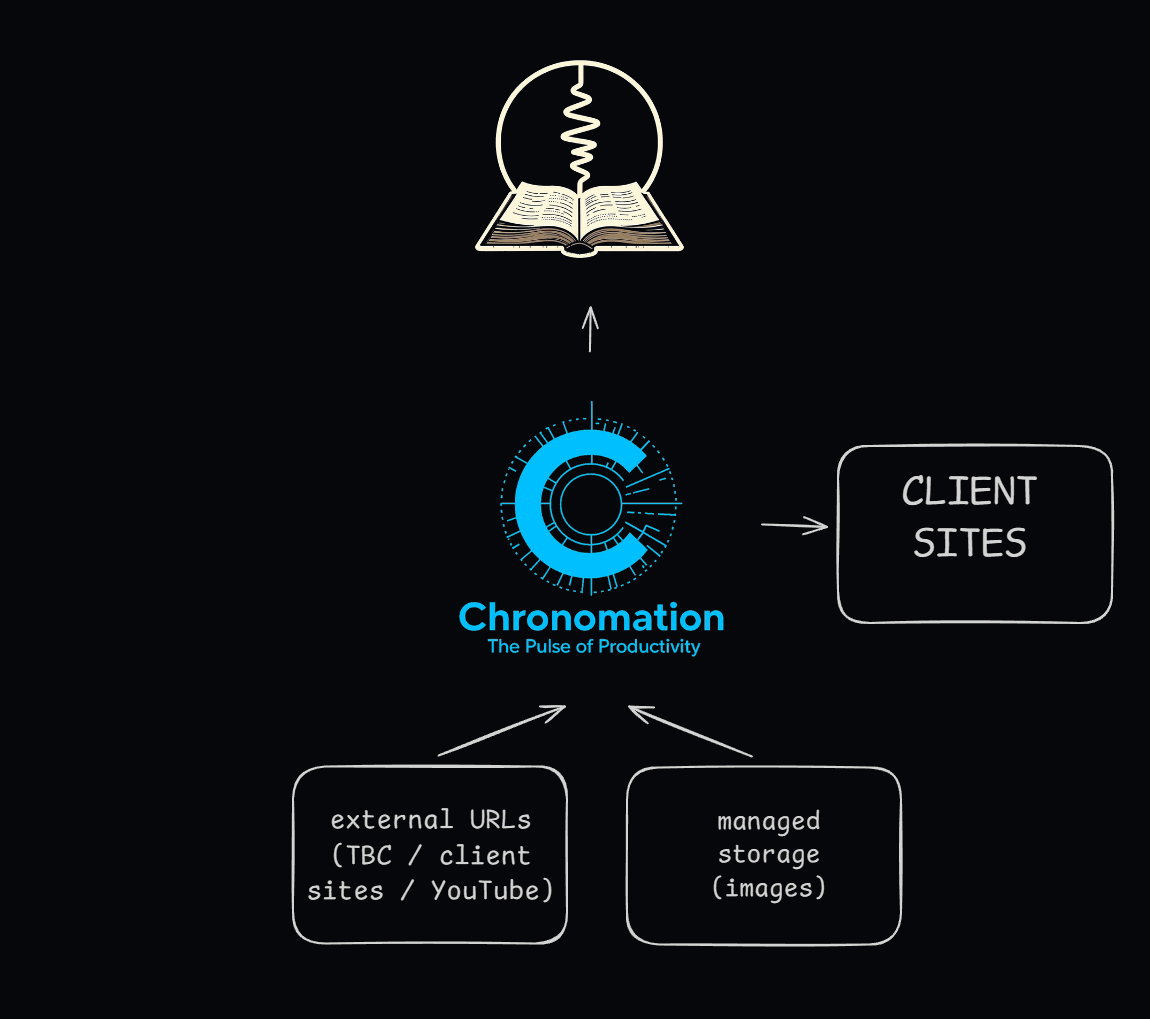
Phase 1: Chronomation + External URLs
The first step to making Chronomation power The Builder Coil is not to introduce new infrastructure. It’s to formalise the idea that media is just another kind of content with a URL.
In the database, that becomes a media_assets table with a tenant-first design:
CREATE TABLE media_assets ( id uuid PRIMARY KEY, tenant_id uuid NOT NULL REFERENCES tenants(id), kind text NOT NULL CHECK (kind IN ('image', 'video_embed', 'file')), storage_provider text NOT NULL CHECK (storage_provider IN ('external_url')), source_url text NOT NULL, alt_text text, created_at timestamptz NOT NULL DEFAULT now());For The Builder Coil as a tenant, Phase 1 looks like this:
- I still add files to
public/media/in the The Builder Coil repo. - Vercel exposes them at
https://thebuildercoil.com/media/.... - Chronomation stores those URLs in
media_assetswithstorage_provider = 'external_url'. - Posts link to media via a join table like
post_media_link (post_id, media_asset_id, role, order_index).
Editor UX
From an editor perspective, I want this to be extremely simple:
- In the admin UI, there’s an Add image button.
- The default mode is From URL.
- Fields:
- Image URL
- Alt text
- Optional caption
- As soon as I paste a URL, I get a live preview.
It’s slightly manual for me (add file → commit → paste URL), but it keeps Chronomation’s early version lean and matches the way The Builder Coil already works.
Phase 2: Managed Image Hosting for Tenants
As soon as external customers start using Chronomation, “host your own images somewhere and paste URLs” stops being enough. Many of the people I want to serve (solo founders, creators, small clinics and SMBs) won’t have a convenient place to host media.
That’s where a managed image layer comes in.
Storage Shape
I don’t need to overcomplicate this. One object storage bucket per environment is enough:
chronomation-media/ tenants/ the-builder-coil/ images/{uuid}.webp clinic-1/ images/{uuid}.webp creator-xyz/ images/{uuid}.webpNeon still holds the metadata; I just add a new storage provider:
ALTER TABLE media_assets ADD COLUMN storage_provider text NOT NULL DEFAULT 'external_url';-- 'managed' means Chronomation wrote it to object storage-- and we have a public CDN URL we can render.ALTER TABLE media_assets ADD COLUMN storage_path text, ADD COLUMN public_url text;For The Builder Coil as a tenant in this phase:
- New uploads go to
tenants/the-builder-coil/images/...in the Chronomation-managed bucket (for examplechronomation-media/tenants/the-builder-coil/images/{uuid}.webp). - By default,
public_urluses the shared media host, e.g.https://media.<shared-host>/tenants/the-builder-coil/images/{uuid}.webp. - For The Builder Coil specifically, I can also point a vanity domain like
https://media.thebuildercoil.com/at the same bucket via a CDN. In that case public URLs can be as simple ashttps://media.thebuildercoil.com/images/{uuid}.webpwhile still mapping internally tochronomation-media/tenants/the-builder-coil/images/{uuid}.webp. - The The Builder Coil frontend uses
public_urldirectly in<img>tags.
Git is no longer the canonical store for images – it just contains the code.
Editor UX: Upload vs. URL
The editor experience shouldn’t care where the file ends up:
- Add media opens a modal with two tabs:
- Upload (for tenants using managed storage)
- From URL (always available)
- Upload tab:
- Drag-and-drop or choose a file.
- Show upload progress and then a thumbnail grid.
- Allow re-use of existing assets across posts.
- From URL tab:
- Same fields as before: URL, alt text, caption.
- Live preview.
Per-tenant limits (max file size, total storage, number of assets) fit naturally into this model and give Chronomation room for plan-based pricing later.
Video: Embed-First, Not a CDN
Images are straightforward. Video is not.
I don’t want Chronomation to turn into a generic video streaming service. For both The Builder Coil and future tenants, the default model is:
- YouTube (or similar) for hosting
- Chronomation for embedding
For The Builder Coil specifically:
- I use a dedicated YouTube channel tied to The Builder Coil.
- Clips showcasing flows or UI changes are uploaded there (public or unlisted).
- Chronomation stores them as
media_assetswithkind = 'video_embed'andsource_urlpointing to the YouTube URL. - The frontend renders them with a simple, responsive
<iframe>component.
Tenants can do the same with YouTube and Loom. Chronomation doesn’t care about the provider; it just detects the hostname and picks an appropriate embed template.
If I ever add managed video hosting, it will be:
- Short clips only
- Behind a CDN
- Tied to specific plans and limits
But that’s a later concern, not a requirement for Chronomation v1.
Why This Matters for Future Clients
Designing media this way gives me a clear migration path:
- The Builder Coil only, file-based – fast to start, zero extra infra.
- The Builder Coil as a Chronomation tenant using external URLs – Chronomation handles the post model; The Builder Coil still self-hosts.
- Managed images for The Builder Coil – one bucket, real upload UI, no more manual URL copying.
- Same managed image flow for external tenants – plus YouTube/Loom/Vimeo embeds for video from day one.
The important part is that the data model doesn’t change radically between steps. A media asset is always:
- Owned by a tenant
- Identified by an ID
- Linked to posts via a join table
- Either hosted externally or managed by Chronomation
That keeps The Builder Coil honest as a first customer and sets Chronomation up to serve other SMBs and creators without having to retrofit media support later.
And yes – it also means I get a nicer workflow for my own devlog in the process. 🌀
Related Posts

Chronomation: Key Architecture Decisions
A deep dive into the architecture decisions behind Chronomation – our multi-tenant content engine. Why we chose Neon, Drizzle, and a tenant-first data model.

The Memory Bank: Theory, Practice, and Agentic Pair Programming
A practical spec system for working with AI coding agents: why I built a memory-bank, how it works day-to-day, and why The Builder Coil version is the template moving forward.
Building a Shared Typography and Layout System for Three Brands
How I’m designing a shared typography and layout system that unifies The Builder Coil, Chronomation and Ball Lightning—starting from body text, a modular scale, and consistent vertical rhythm.